 JARIYAH
A donation kiosk for your masjid
Jariyah’s donation kiosk is a portrait touchscreen by the masjid door. A visitor taps an amount, picks a fund such as Sadaqah or Zakat, and taps a card on the Square terminal beside it. The gift goes straight into the masjid’s own merchant account and is recorded against the fund the donor chose.
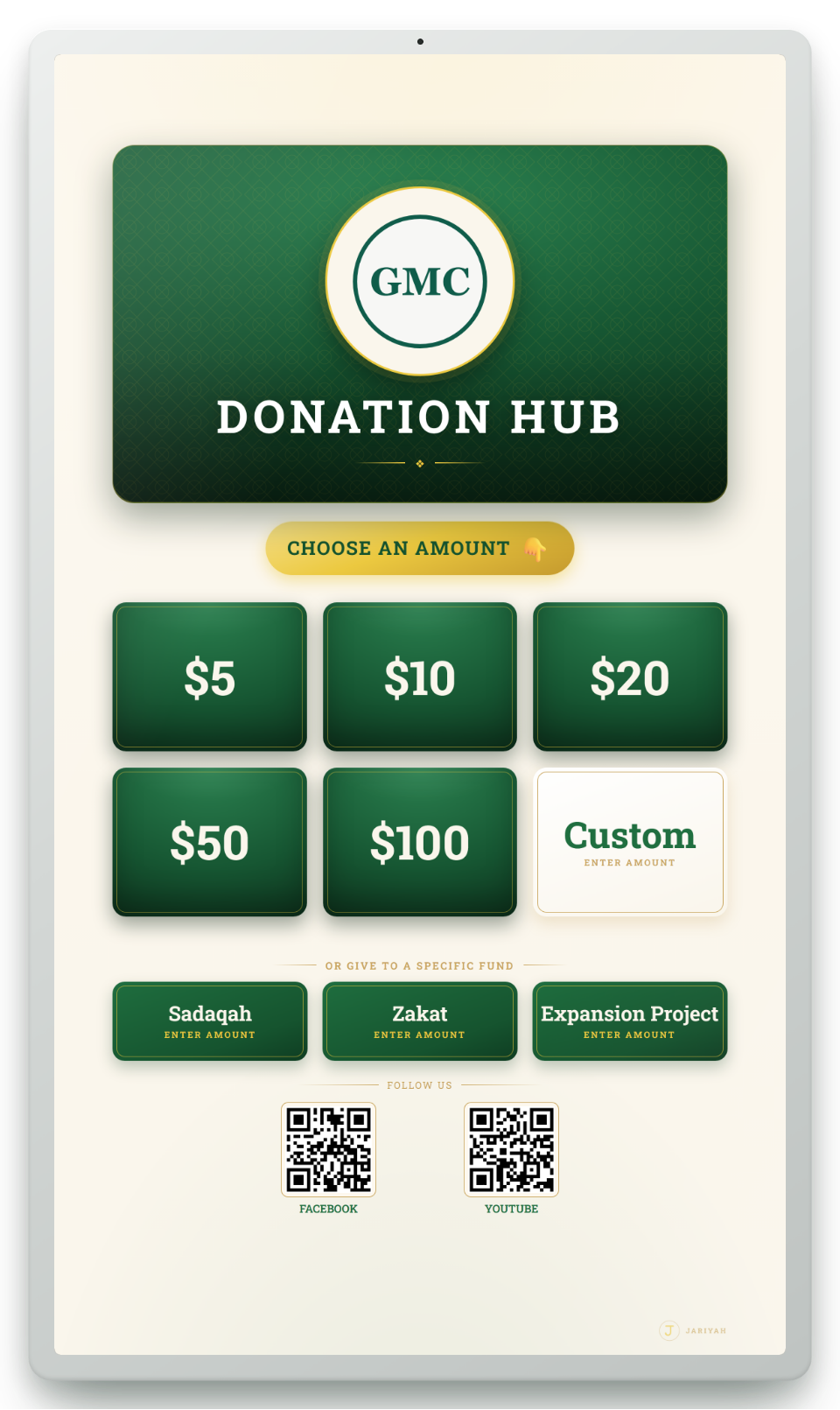
Donation kiosk
What it does
Amounts and funds, your way
Preset amount tiles, and an on-screen keypad for any other amount. The funds on screen are your masjid’s own, named and ordered your way — Jariyah never invents a fund.
Card gifts into your own account
A Square card terminal beside the screen takes the payment. The money goes to the masjid’s own merchant account; Jariyah never holds donations.
Always portrait
Shaped like a monitor turned on its side, the way a kiosk hangs on a masjid wall. It shrinks to fit any portrait screen rather than cut a fund off.
Your name, your QR codes
Your masjid’s name, logo and colours on the glass, and your social media accounts as QR codes to follow you. With no logo on file it draws your initials, never another masjid’s crest.
Tax receipts for registered charities
With official receipts turned on and a CRA charity number on file, a Tax receipt button shows a QR code that opens the donor’s official receipts in the member app.
A payment is never lost
Each payment is written down before the card is charged. Every five minutes the platform asks Square about any payment still open, so a charge whose answer was lost becomes exactly one recorded gift.
A panel for the office, on the glass
Behind a PIN, the kiosk’s own panel shows its health and this screen’s collections and runs a $1 test payment — on one screen, with amounts edited on the kiosk’s number pad.
Many kiosks, one office
Put one at every entrance or in every building. Each location can have its own funds, amounts and QR codes, and every kiosk reports to the same console.
How it works
How it works for a masjid
- 1
We set it up
Your funds, amount tiles, QR links, name and colours are configured for you from the Jariyah platform, per location, and changed whenever you ask.
- 2
Pair the screen
On the kiosk, open your masjid’s kiosk address and type the pairing code. The Square terminal beside it is linked with a code too.
- 3
Visitors give
Amount, fund, card. No app to download and no account to open.
- 4
The office sees it
Each gift shows on the console’s Kiosks page and in the reports and, with Bookkeeping, in the books against its fund.
People
Who uses it
Visitors and donors
Give in a few taps, with nothing to sign up for.
The office
Sees every kiosk from the console: online or dark, when it was last heard from, its version and its gifts today.
The treasurer
Reads kiosk gifts by day and by kiosk, and finds each one in the books.
Staff
Pair a new screen or check an old one. Pairing is a staff job, not an owner’s.
One platform
How it connects to the other services
- BookkeepingEach card gift posts to the books by itself, against its fund.
- Member appThe kiosk’s Tax receipt QR code opens the donor’s official receipts in the app.
- Donor managementKiosk gifts count in the giving reports, beside the gifts recorded at the office.
- Prayer-time displayThe wall screen adds up what was raised from the same gift records the kiosk writes.
- Admin consoleThe console lists every kiosk, with its status and its gifts today.
Questions
Donation kiosk: common questions
Does a donor need an app or an account to give at the kiosk?
No. A visitor walks up, taps an amount, picks a fund and taps a card on the terminal beside the screen. There is nothing to download and no account to open, so a guest at Jumu’ah can give as easily as a regular member of the congregation, and then walk on.
Where does the money from the kiosk go?
Straight into your masjid’s own merchant account. Card payments are taken by a Square terminal linked to the masjid’s own Square account, and Jariyah never holds donations. Each gift is recorded against the fund the donor chose, and with Jariyah Bookkeeping it posts to your books by itself.
Can we have more than one kiosk?
Yes. A masjid can run several kiosks at different entrances or in different buildings. Each location can have its own funds, amount tiles and social media QR codes, set up from the Jariyah platform, and every kiosk reports to the same admin console and the same books.
What happens if the internet drops during a payment?
The payment is written down before the card is charged, and every five minutes the platform asks Square about any payment still open. A charge whose answer was lost becomes exactly one recorded gift, never two and never none, and the kiosk never leaves a payment screen while a card is at the terminal.
Why is the kiosk always portrait?
Because a kiosk on a masjid wall is a monitor turned on its side, and Jariyah makes it portrait always, as a rule of the product rather than a setting. It shrinks to fit any portrait screen instead of cutting a fund tile off, so every fund stays visible and easy to reach.
Can donors get a tax receipt from the kiosk?
Yes, when your masjid is a registered charity with official receipts turned on. The kiosk’s Tax receipt button shows a QR code that opens the member app, where donors see and download the official receipts the masjid has issued them. Without a CRA charity number on file, the button does not appear.
Talk to us
Ask about the donation kiosk
We will show you the donation kiosk and set it up for your masjid, with your name, your people and your funds.