 JARIYAH
Does a mosque screen need internet to show prayer times?
It needs the internet to be paired and to stay current, not to keep showing for up to a week. Jariyah’s prayer-time display holds the last screen it received with the week’s prayer times, so when the connection drops it keeps today’s adhan and iqamah on the wall and says how long ago it was updated.
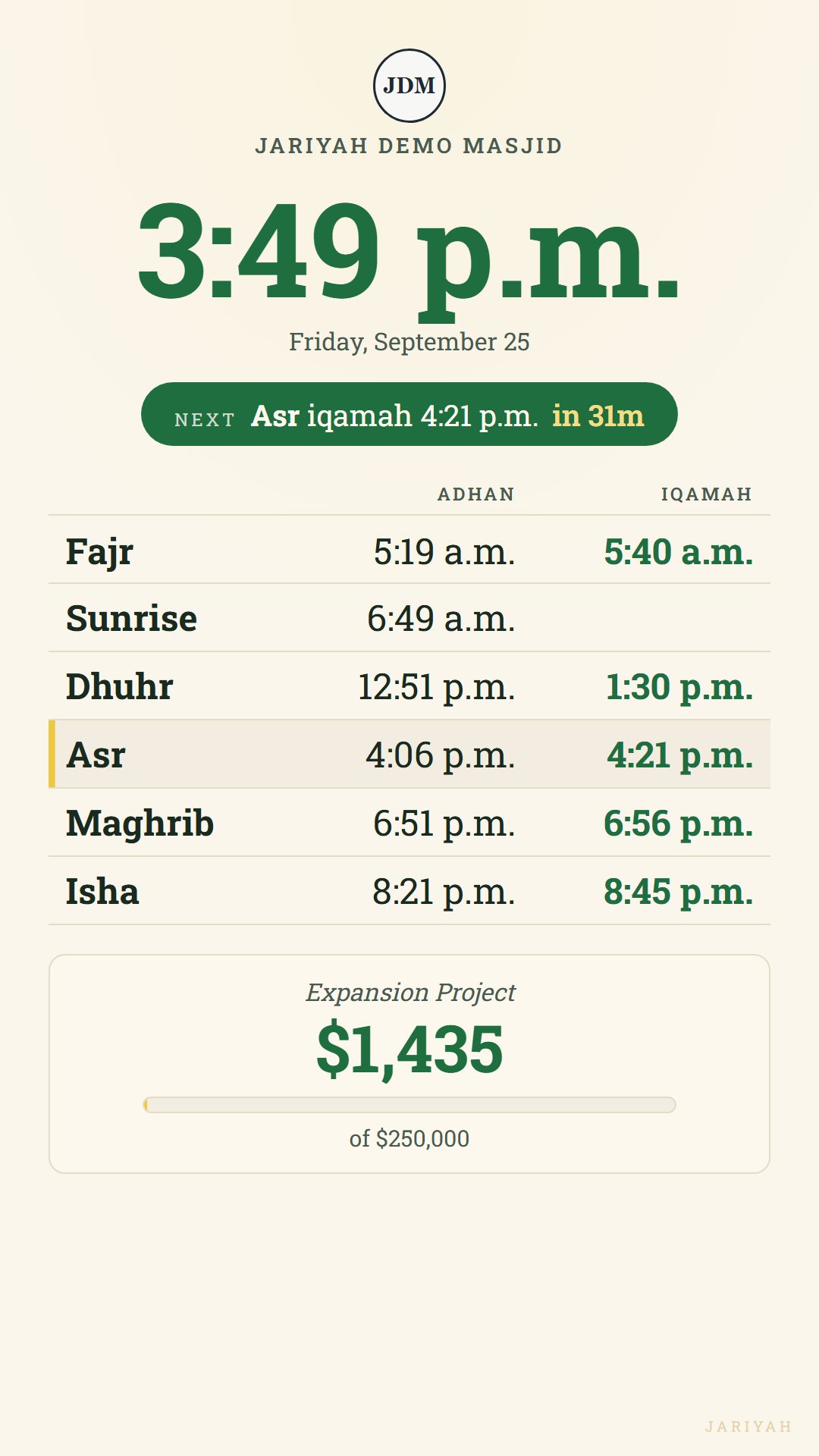
When the prayer times display goes offline
What does the screen show if the internet goes down?
It keeps showing the last screen it received, and once its figures are out of date it says how long ago they were updated. Each day’s adhan and iqamah are taken from the week of times it holds, on your masjid’s own clock, so the table stays right for up to a week while the connection is down.
Paired once, online
A screen is paired with a code at your masjid’s display address, which needs the connection. From then on it signs in by itself, as a device, with nobody signed in in front of it.
Every thirty seconds
While the connection holds, it asks for new figures every thirty seconds, so a changed iqamah, a new event or a gift at the kiosk shows at its next answer.
When the connection drops
It keeps the last screen it received instead of going blank. The clock keeps time, and each day’s row of adhan and iqamah is taken from the week of times it holds.
Honest about its age
Once it has missed three answers, a line on the screen says how old its figures are, such as “Updated 2 hours ago”, and the console’s Displays page shows that the screen went quiet.
What waits for the connection
The line naming the next prayer and the warning before an iqamah count down from the last answer, so in a long outage they fall behind; the day’s table does not. A screen switched off while the connection is down cannot open again until it is back.
A portrait prayer display
Does it work on a portrait screen?
Yes. A Jariyah prayer screen lays itself out for the glass it is on: on a screen taller than it is wide, the clock and the next prayer sit above the day’s adhan and iqamah, Jumu’ah and the amount raised; on a television wider than it is tall, they sit side by side.
Sized for the room
Every size is a share of the screen, not a number of pixels, so a 43-inch television in the foyer and a 27-inch monitor in a corridor give the times the same share of the glass.
The times come first
On a portrait screen the What’s on panel keeps to three programmes and leaves out the verse of the day, so Maghrib and Isha are never pushed below the bottom edge.
Read from across the hall
Large figures for the clock and the times, the next prayer marked in the table, and seconds never shown, so the screen can be read at a glance from the back rows.
Nothing to tap
Paired once with a code, then left alone: there is no button on it and nobody signs in on it.
Several rooms, one account
Can one masjid run prayer screens in multiple rooms?
Yes. Each screen is paired on its own and placed in a building, under the one Jariyah account. Every screen in a building shows that building’s prayer times, events and fundraising; a second building gets its own times for where it stands and its own headline and goal, and the office sees every screen from one console.
Two halls, one countdown
Screens in the same building count down from the time the platform worked out, not from their own clocks, so the main hall and the sisters’ hall agree even if the two screens’ clocks do not.
Per building
Each screen belongs to a location, and its headline, goal and counting window can differ from one building to the next.
Prayer times per building
Coordinates, time zone, calculation method and iqamah rules are set for each building, so a hall across town gets its own Fajr and Isha.
Every screen’s status
The console’s Displays page lists every screen, whether it is online, and when it was last heard from.
Questions
Mosque prayer screens: common questions
Does a masjid prayer screen need a smart TV?
No particular television. Jariyah’s display is a web page at your masjid’s own display address, so a screen that can open a modern web page full screen should do: a television’s own browser, or a monitor with a small computer behind it. Jariyah has not tested or certified a particular television or box.
What does the prayer screen show?
The time, the date, the next prayer with a countdown, today’s adhan and iqamah and your Jumu’ah sittings, from the same schedule as the member app. With them: what’s on, and the amount raised, with a progress bar when you set a goal. In the last minute before an iqamah, the whole screen asks for phones on silent.
Does the screen show the Hijri date?
On the days your office sets one. The Hijri date appears beside the date when a day’s times were typed by hand with it, as in Ramadan; on calculated days the screen shows the Gregorian date alone, because Jariyah does not yet work out the Hijri date by itself.
Can the office see what the screen shows without standing in the hall?
Yes. The console previews the display with your masjid’s own prayer times, events and figure, at a portrait or a wide screen’s size, before any screen is bought or paired, and for each screen you have. The preview only reads: it changes nothing, and the Displays page says whether each real screen is online.
How much does a prayer-time display cost?
Jariyah does not publish prices. The prayer-time display is one of your masjid’s services, switched on beside the others it uses, and it runs on a screen your masjid already owns or chooses. Call or text Ashique Hossain at 306-209-3923 to talk it through.
Talk to us
Put your prayer times on the wall
Tell us about the screens in your prayer hall, and we will show you the display with your own times, set your prayer-time rules for each building, and pair the screens with you.