 JARIYAH
The admin console: your masjid’s office in one place
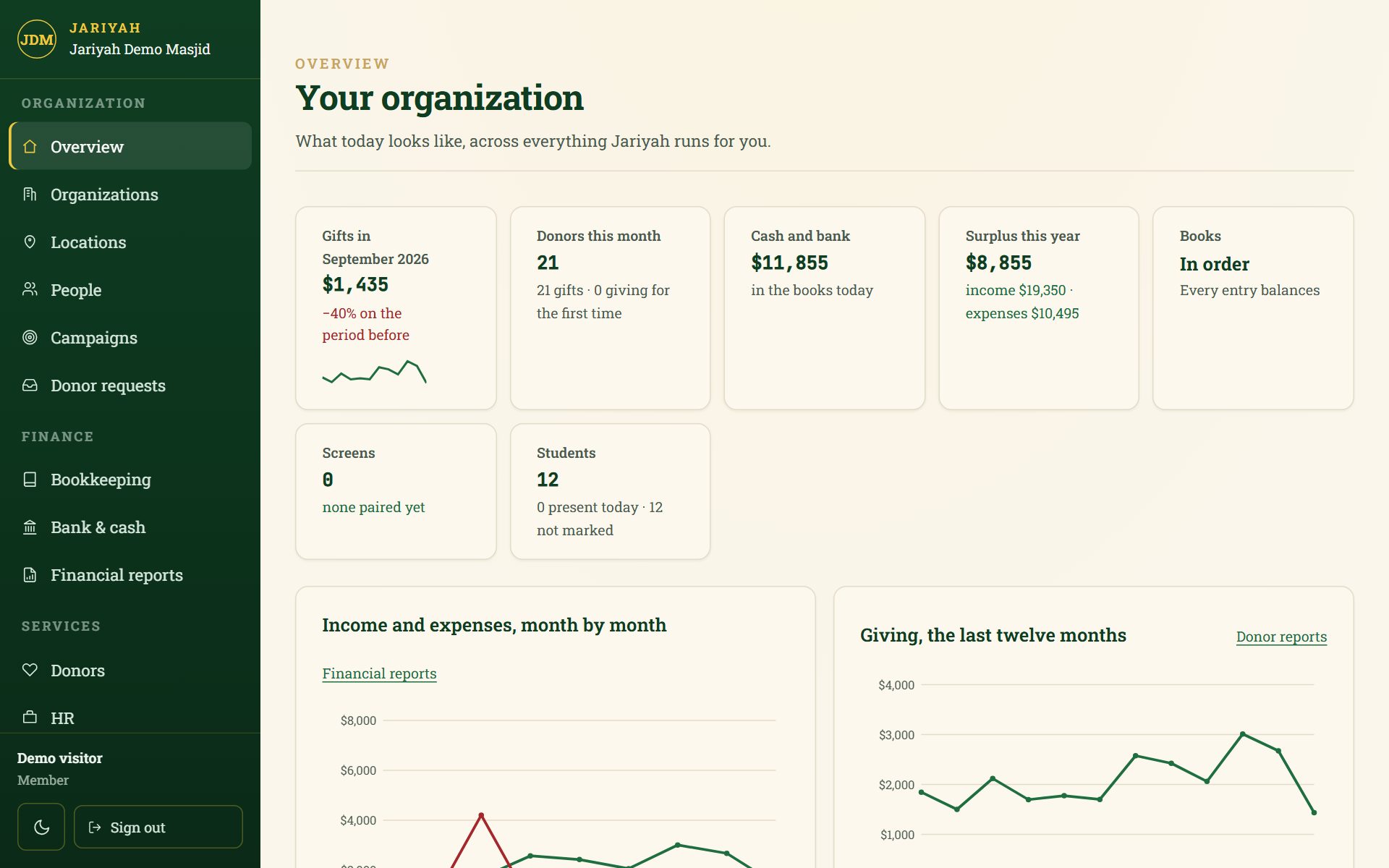
Jariyah’s admin console is the one place a masjid’s office works: a dashboard of today’s figures, then donors, campaigns, the books, HR, the madrasha, kiosks and displays, prayer times and settings. It is the masjid’s ERP. Everyone signs in once, and each person sees only what their role allows them to see.
Admin console
What it does
A dashboard of today
Gifts this month with a twelve-month trend, donors, cash and bank, the surplus this year, the books’ health, screens online and students — each shown only when your masjid uses that service.
People and roles
Owner, administrator, staff, teacher and viewer, each described in plain words. The last owner can never be removed or demoted.
Finance
Bookkeeping, bank and cash, and financial reports, together under Finance.
Every service in one menu
Donors, HR, the madrasha, campaigns and donor requests appear as your masjid switches them on.
Kiosks and displays
Every screen: online or dark, when it was last heard from, its version, its card terminal and its gifts today.
Prayer times from a map
Pin the building on a map, pick the calculation method, type the iqamah rules, and see the times before anything is saved.
Settings in plain words
Legal name, address, charity number, contact buttons, name and colours. A value you have not given is left out, never borrowed from someone else.
Careful sign-in
Passwords of at least twelve characters, sessions that expire, and a lockout after repeated failed attempts.
How it works
How it works for a masjid
- 1
We set up your organization
Your name, locations, services and roles, configured by the Jariyah team.
- 2
Invite your team
Each person accepts an invitation and chooses their own password.
- 3
Give each person a role
Owner, administrator, staff, teacher or viewer.
- 4
Work from one place
The menu shows only the services your masjid uses and the pages each person may open.
People
Who uses it
Owner
Full control, including money. At least one person must hold it.
Administrator
Runs the organization day to day: everything except changing what the organization pays for.
Staff
Sees people and places, invites new members and keeps the kiosks running.
Teacher
Sees the madrasha students they teach, and nothing about money.
Viewer
Can look, and cannot change anything.
One platform
How it connects to the other services
- BookkeepingThe books, bank and cash, and financial reports, under Finance.
- Donor managementDonors, receipts, campaigns and donor requests.
- HR & payrollStaff, hours, pay runs and remittances.
- MadrashaStudents, classes, fees and messages to parents.
- Donation kioskEvery kiosk’s status and gifts today.
- Prayer-time displayEvery wall screen’s status, and the prayer-time settings.
Questions
Admin console: common questions
Is the admin console the same as an ERP?
Yes. For a masjid, the admin console is the ERP: the books, donors, payroll, the madrasha and the devices live in one console rather than a separate system. It is built for a non-profit, so it speaks of donors, funds and net assets, never of customers and invoices.
Does each service need its own login?
No. Your team signs in once, and the console shows the services your masjid uses and the pages each person may open. Someone who works for two organizations on Jariyah keeps one account, with a membership in each, rather than a second password to remember and to lose.
What can each role do?
An owner has full control, including money. An administrator runs everything day to day except what the organization pays for. Staff see people and places, invite members and keep the kiosks running. A teacher sees only their madrasha students, and a viewer can look without changing anything.
Is hiding a menu item the only protection?
No. The menu only hides what a person cannot use. On every request, the server checks both what your masjid has switched on and what that person may do, and every masjid’s records are kept apart in the database itself, so a hidden page is never the only lock on the door.
Does the admin console work on a phone?
Yes. Jariyah’s rule is that every screen works at phone width without sideways scrolling, and the console is checked in a real browser at phone and laptop sizes. Back, Forward and Refresh behave the way they do on any website, so a page, a tab and an open record stay put.
Talk to us
Ask about the admin console
We will show you the admin console and set it up for your masjid, with your name, your people and your funds.