 JARIYAH
HR and payroll for your masjid’s staff
Jariyah HR & payroll keeps your masjid’s staff records, hours and pay in one place. It works out CPP, CPP2, EI and income tax itself from the formulas the CRA publishes, produces pay runs and paystubs, and shows what is owed to the CRA and when, with SINs and bank details stored encrypted.
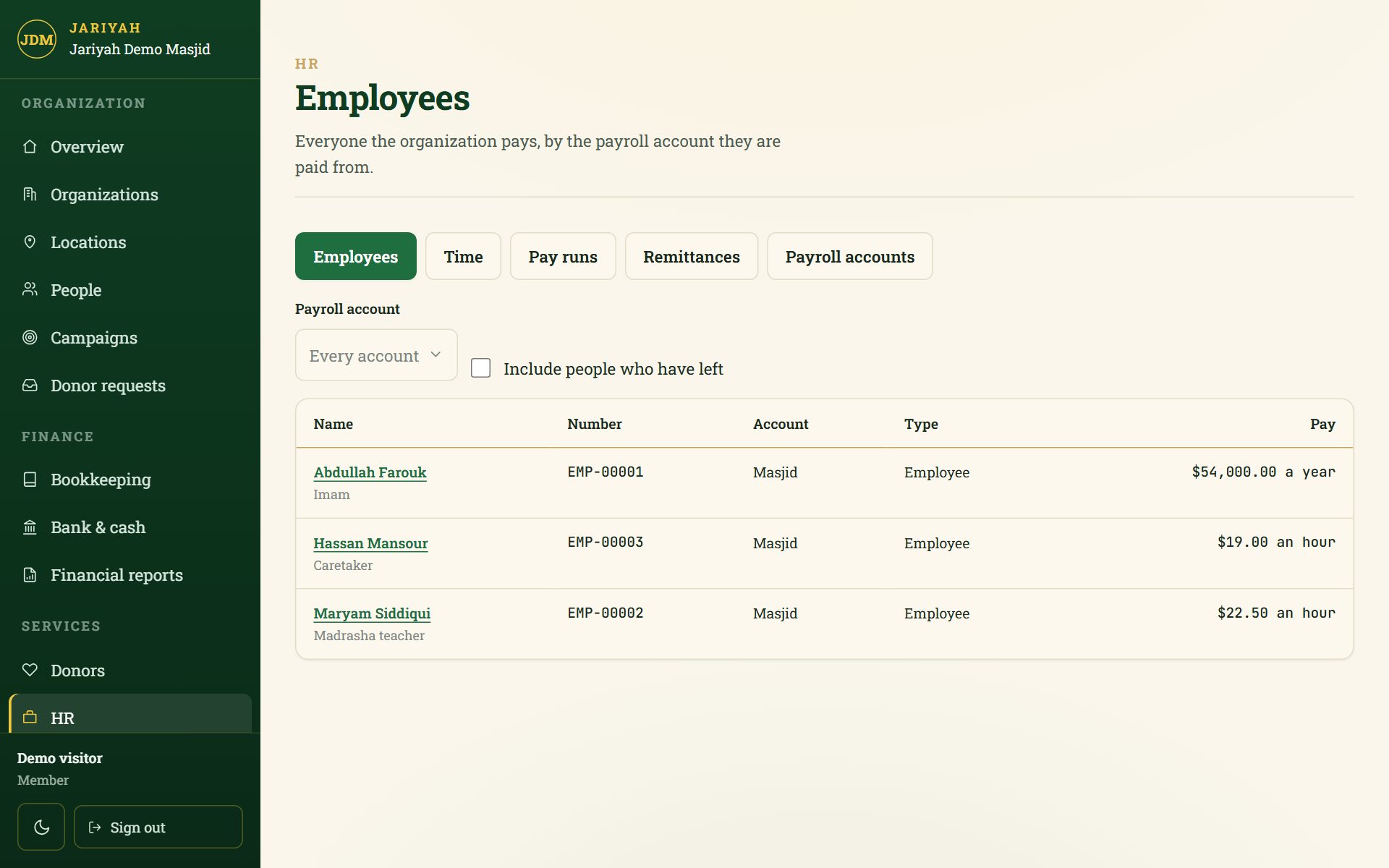
HR & payroll
What it does
Staff records
Employees and contractors, hourly or salaried, each numbered and paid from a CRA payroll account from a date. Nobody is deleted; leaving records the reason from the Record of Employment’s list.
SIN and bank details, protected
Stored only encrypted and shown masked. Seeing one in full needs its own permission and is written to the audit log every time.
Hours, day by day
Clock-in and clock-out with breaks, night shifts that count, your rounding rule, and approvals that lock the days they cover.
Hours from Square
Link a staff member to their Square team member once, then import a month of finished timecards. A person’s correction is never overwritten.
Deductions worked out by Jariyah
CPP and CPP2, EI, federal and Saskatchewan income tax, TD1 claims, bonuses and part-period salaries, from the CRA’s T4127 formulas for the pay date.
Pay runs and paystubs
Prepare a run, adjust it while it is a draft, and make it final with a separate approval. A final run is locked; a correction is a new run.
Remittances to the CRA
Each period’s amount and due date for your remitter type, recorded with the day paid and the confirmation number. A short payment reads “Short by” the amount.
Vacation pay
Kept in a vacation bank or paid out on each cheque, as each employee’s terms say.
How it works
How it works for a masjid
- 1
Set up your payroll account
Your CRA payroll program account, province, pay frequency and remitter type.
- 2
Add your staff
Employees and contractors, how each is paid, TD1 claims, SIN and bank details.
- 3
Approve the hours
Entered day by day or imported from Square, then approved for pay.
- 4
Run pay and remit
Prepare, approve, issue paystubs, and record each remittance to the CRA.
People
Who uses it
Owners and administrators
Keep staff records and hours, prepare pay runs and record remittances.
Whoever approves pay
Making a run final is its own permission, apart from preparing it, so one person can prepare and another approve.
The treasurer
Can read what is owed to the CRA without being able to mark it paid.
One platform
How it connects to the other services
Questions
HR & payroll: common questions
Does Jariyah calculate CPP, EI and income tax itself?
Yes. Jariyah works out CPP, CPP2, EI and federal and provincial income tax from the formulas the CRA publishes in T4127, choosing the rules by pay date. It is tested to the cent against the CRA’s own worked examples, and an accountant checks results against the CRA’s online calculator before a masjid’s first real pay run.
Which provinces does the payroll cover?
Federal rules and Saskatchewan today, and Quebec is not covered. The rules are stored as data, one set per province and date, each with the CRA publication it came from, so a pay date with no rule set is refused rather than guessed. Ask before you rely on it for another province.
How are remittance due dates worked out?
From your payroll account’s remitter type: regular remitters by the 15th of the next month, quarterly remitters by the 15th after the quarter, threshold 1 on the 25th and the 10th, threshold 2 three working days after each period. Holidays are not counted, so a due date is never later than the CRA’s.
Can a finished pay run be changed?
No. A final run is locked: no edits, no re-working and no discarding. A correction is made with a new run. A period already remitted to the CRA also locks the runs in it, because changing them would change what the CRA has already been told was owed.
Does it produce T4 slips?
Not yet. Pay runs, paystubs, the year to date, the vacation bank and the CRA remittance worksheet are built today; T4 slips and the T4 Summary are not. If your masjid needs year-end slips from Jariyah, raise it when you call, before you rely on the service for them.
Who can see a staff member’s SIN?
Only someone whose role includes the permission to reveal it — by default the owner and administrators. The SIN and bank details are stored only encrypted and shown masked everywhere else, and every time one is shown in full, that is written to the audit log with who looked.
Talk to us
Ask about HR & payroll
We will show you HR & payroll and set it up for your masjid, with your name, your people and your funds.